Finding the right connector is simpler than ever thanks to the standardisation of the UK charging network. But, if you’re new to electric vehicles or switching from a different model, our guide will help you understand which charging connector your electric vehicle uses so that you know which electric vehicle chargers are compatible.
In this guide, we explain the different EV connector types found on car chargers in the UK and beyond - from Type 2 to CCS and CHAdeMO, so whether you’re going to charge at home or on the public network, we’ll help give you the confidence to charge your EV, wherever you go.
What is an EV connector?
A charging connector is the socket or plug that connects EV chargers to cars. It forms part of the EV infrastructure as explained in the image below.
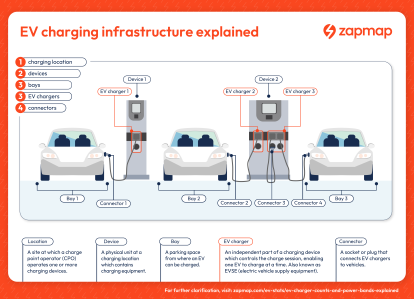
For a more in depth look at EV charging infrastructure, check out our EV charger counts and power bands explained guide.
What are the different EV connector types?
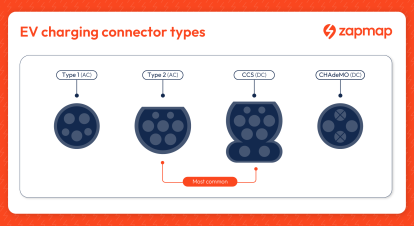
Electric vehicles have two ways to charge the battery, using AC charging where the most common connector is Type 2, and DC charging where the main connector type is CCS, with some legacy models using CHAdeMO.
AC (alternating current) charging converts the power using the onboard charger, ideal for slower overnight or destination charging and DC (direct charging), which goes directly to the cars system, is ideal for when drivers need a faster charge.
AC charging
Type 1 (J plug) connectors are used for AC charging for a few older EVs, notably on older Nissan Leaf models. They have a five-pin connector and support AC charging up to 7.4kW. These models will need a Type 1 to Type 2 cable to access the AC public network.
Type 2 (Mennekes) connectors are the standard for EVs in the UK (and Europe) for home and public AC charging. They have a seven-pin connector and typically support power levels from 3.7kW - 7.4kW for home, workplace, and on-street charging, but also can support higher power levels with 3 phase power 22kW, or less commonly 43kW for enhanced charging. A Type 2 to Type 2 cable is required for most modern EVs.
DC charging
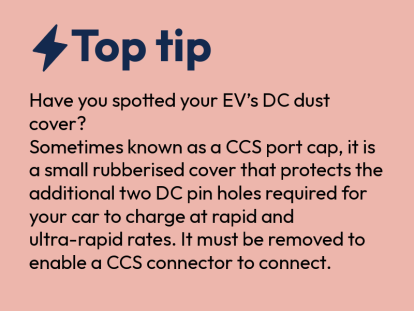
CCS (Combined Charging System) connectors are the standard for Rapid DC charging in the UK and Europe. They look similar to the Type 2 connector, but have an additional two DC pins. They support Rapid and Ultra-rapid charging with power levels from 25kW to 400kW+.
CHAdeMO connectors are primarily used for Rapid DC charging on older Nissan Leaf models. They support Rapid and Ultra-rapid charging with power levels from 25kW up to 400kW although the most common is 50kW, and in the UK there are few CHAdeMO chargers powered at more than 100kW.


Other less common connectors:
Tesla Type 2 connectors are used for both AC and DC charging on older Model S and Model X vehicles. While they share the same physical shape as a standard Type 2 connector, Tesla’s version is modified to allow for high-power DC charging at Tesla Superchargers. They support AC charging at home or destination points up to 11kW or 22kW, and DC Supercharging up to 150kW. A Type 2 to Type 2 cable is required to connect to Tesla home and public AC chargers. Tesla Superchargers use tethered EV charger cables for DC charging, so no additional EV cable is required.
Commando connectors are used for heavy-duty AC electric car charging. Often found at campsites, marinas, and workshops, they are designed to handle high current for long periods more safely and reliably than a standard 3-pin plug. Commando connectors are sometimes used by EV drivers as a cost-effective alternative to a fixed wallbox for at home charging. To use this method, a Type 2 to Commando portable EV charging cable is required, featuring a 5-pin Commando plug on one end and a Type 2 vehicle connector on the other.
3-pin connectors are used for "trickle charging" via a standard UK domestic socket. They support AC charging at power levels of approximately 2.3kW, and a full charge for a large EV battery can take over 24 hours. To use this method, a portable charging cable with a standard UK 3-pin plug connector at one end and a compatible connector for your EV (typically Type 2 or Type 1) at the other. Charging with a 3-pin plug, whilst it can be useful occasionally, is not recommended, as it is slow, and poses safety risks from the socket overheating or continuous draw of high current.
Home vs. public charging: Do I need a different cable or connector?
Home chargers typically have Type 2 inlets, although some have Type 1, and support power levels up to 7.4kW as most homes have one phase power.
Home chargers can be either tethered where the cable is permanently attached to the charger, or untethered where the driver uses their own cable.
If the Home charger is untethered then the cable will need to have the right connector at each end. This will typically be Type 2 to connect to the home charger inlet, and Type 2 to connect to the EV inlet. In some cases this will be Type 1 to Type 2. The right cable will be provided when the car is purchased.
Public AC chargers (Standard and Standard Plus) typically have Type 2 connectors, which is the standard for the UK, the power provided is between 3kW-7kW and 8kW-49kW respectively.
Most of these units are untethered, you will need to use your own charging cable to connect.
In most cases, this will be a Type 2 to Type 2 cable, though some older vehicles may require a Type 1 to Type 2 cable.
Public DC chargers (Rapid and Ultra-rapid) feature a CCS connector, which is the universal standard for almost all new EVs in the UK and Europe, and typically provide power between 50kW-149kW and 150kW+ respectively.
Some units also provide a CHAdeMO connector for compatible models.
For Rapid and Ultra-rapid public charging you’ll find the chargers are tethered, meaning the cable is permanently attached to the unit. Because you cannot use your own cable for these high-power chargers, you must ensure the connector on the unit is compatible with your car’s charger inlet.
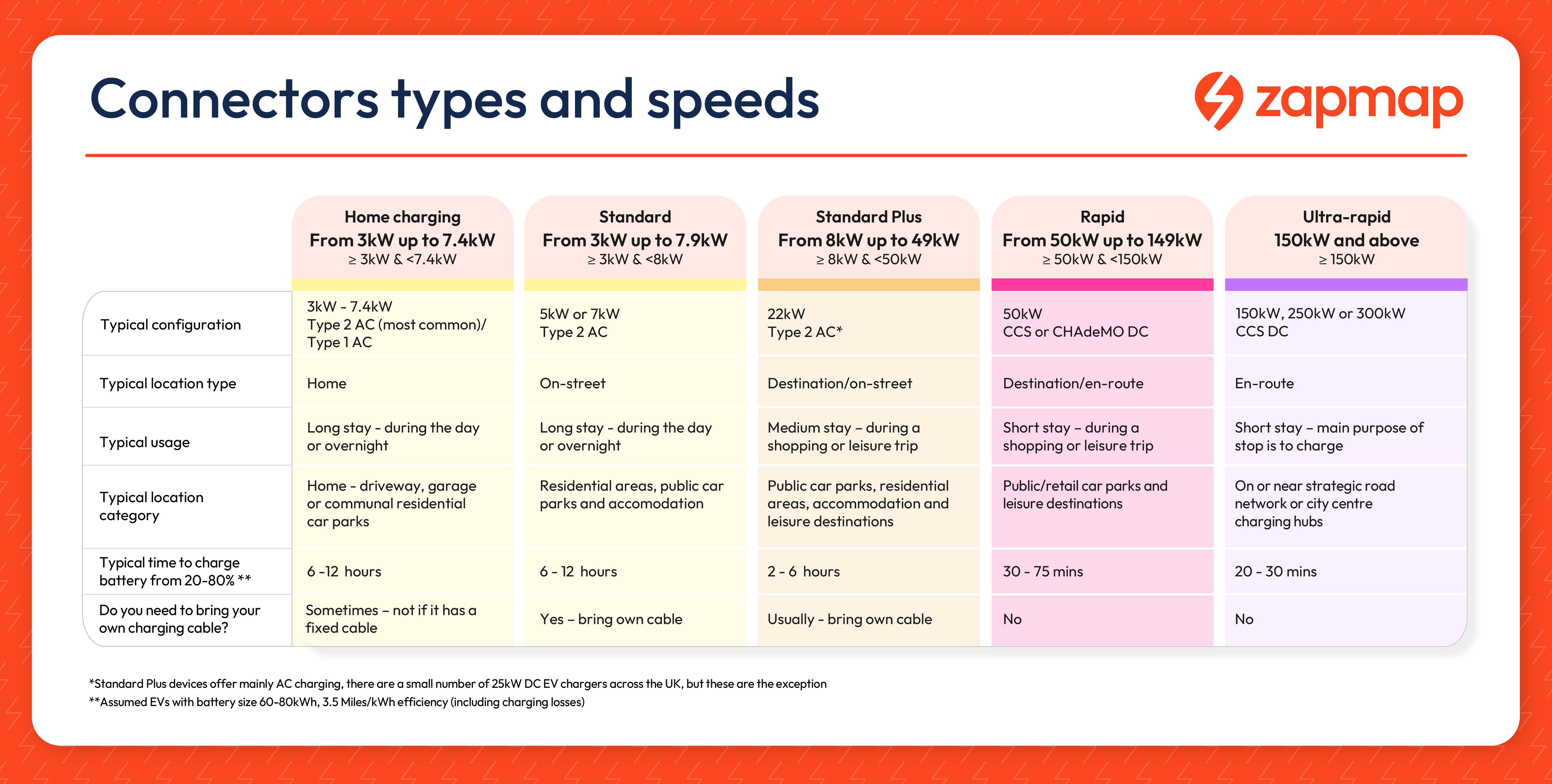
To get an understanding of the length of time it will take to charge your EV whether at home or on the public network, take a look at our How long does it take to charge an electric car? guide.


How do I find the right charger for my EV on the public network?
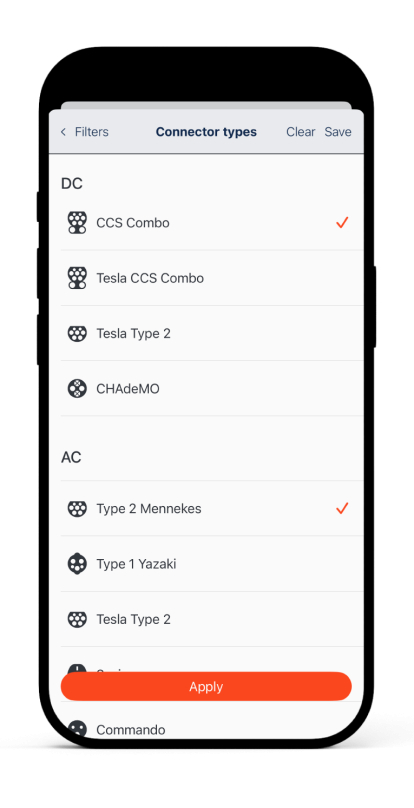
Adding your EV model to your Zapmap account means that compatible connectors for your EV will automatically be shown. To do this, open the account menu and go to ‘Your EV Models’. Press ‘Add your EV model’, select your brand and model, then press ‘Update’.
You can use the Zapmap app to filter for your specific connector type, ensuring you only see chargers compatible with your vehicle.
You can also use Zapmap’s filters such as Pricing per kW and Power rating via our easy-to-use sliders, to further narrow down your search for a charger to meet your preferences for any type of journey, across on-street, en-route and destination charging location types.
Adding more than one vehicle to your account requires a Zapmap Premium subscription. Premium subscribers also benefit from unlimited route saves, in-car compatibility via CarPlay or Android Auto, 5% off the cost of charging when you pay via the app or with a Zapmap charging card, and many more advanced filtering options.